The Mediatopia CMS · Online shop
An ecommerce CMS that sells to everyone you sell to
Sell to the public, to the trade, and without holding stock, from one shop on your own website. Products, basket, checkout, your own card payments, delivery, VAT, orders and invoices, all in the same system as the rest of your website.
What is an ecommerce CMS?
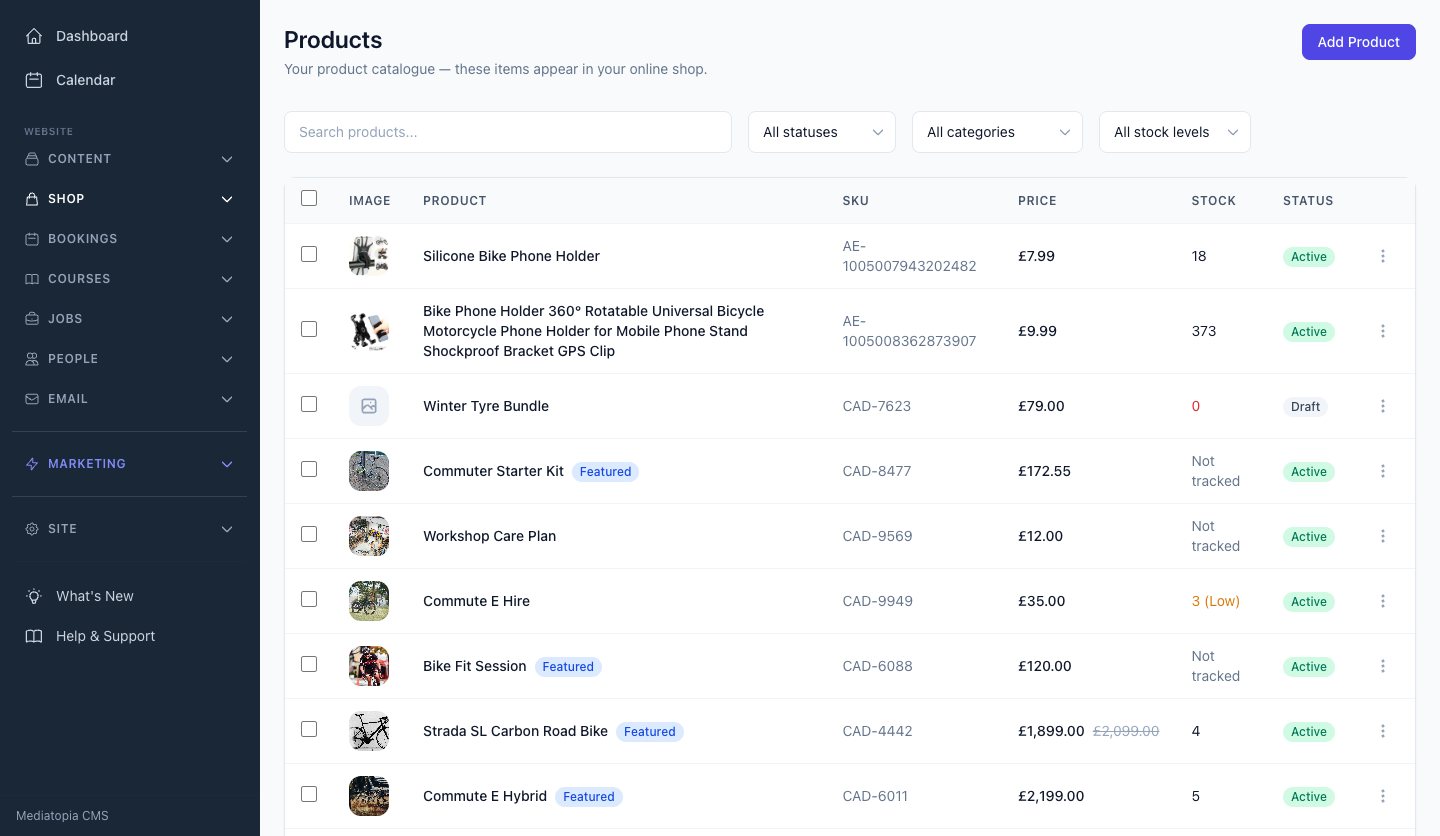
An ecommerce CMS is a content management system that can sell. It holds your products, prices and stock, runs the basket and checkout on your website, takes the payment, and keeps every order and customer, alongside the pages, news and pictures every website has. You sign in to one place to change a price, add a product, see what’s been ordered and mark it as sent.
Most websites that sell are built one of two ways. Either they’re a shop platform with a website squeezed around it, so the shop is easy and everything else is a struggle, or they’re a website with a shop plugin bolted on, which works until the plugin, the theme and the payment add-on stop agreeing with each other. An ecommerce CMS built as one system avoids both: the shop and the rest of the website are the same thing.
Why sell through the Mediatopia CMS?
Because your shop is part of everything else your website does. A customer who books a service can buy the parts; a member signed in to your members area sees their orders next to their bookings; a trade customer’s order on account raises its own invoice in the same system you send your other invoices from. Nothing is copied between systems and nothing is out of step.
Your card payments go into your own Stripe account, so the money is yours from the moment it’s paid and never passes through ours. Your shop is designed around your business, not picked from a theme. And because it’s our own system, there are no plugins to update and no add-on that can break your checkout on a Monday morning.
- One system for your shop, pages, bookings and members
- Card payments into your own Stripe account
- Designed for your business, not a theme
- No plugins to update or break
It is the ecommerce CMS behind our ecommerce website design and ecommerce development, sold as pay monthly ecommerce websites, and it runs dropshipping shops too.
Sell to the public, to the trade, or without holding stock
Most shops sell one way. The Mediatopia CMS sells all three, on one website, from one set of products, so you can start with one and add the others when your business is ready.
Selling to the public
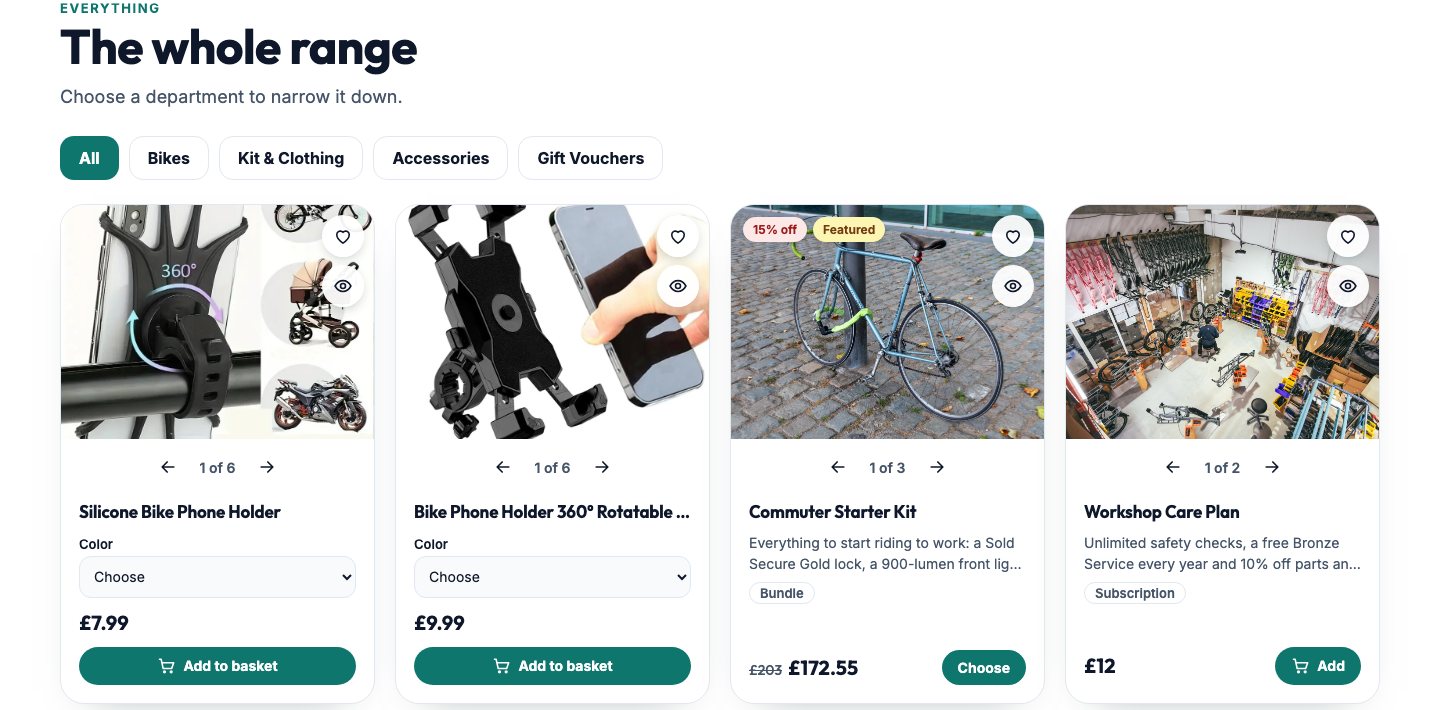
The everyday shop. Products with photographs and prices, a basket and a secure checkout, delivery or collection, and an order emailed to you and your customer the moment it’s placed. Offers and coupon codes come off in the basket, and customers can make an account and order again in two clicks.
Selling to the trade
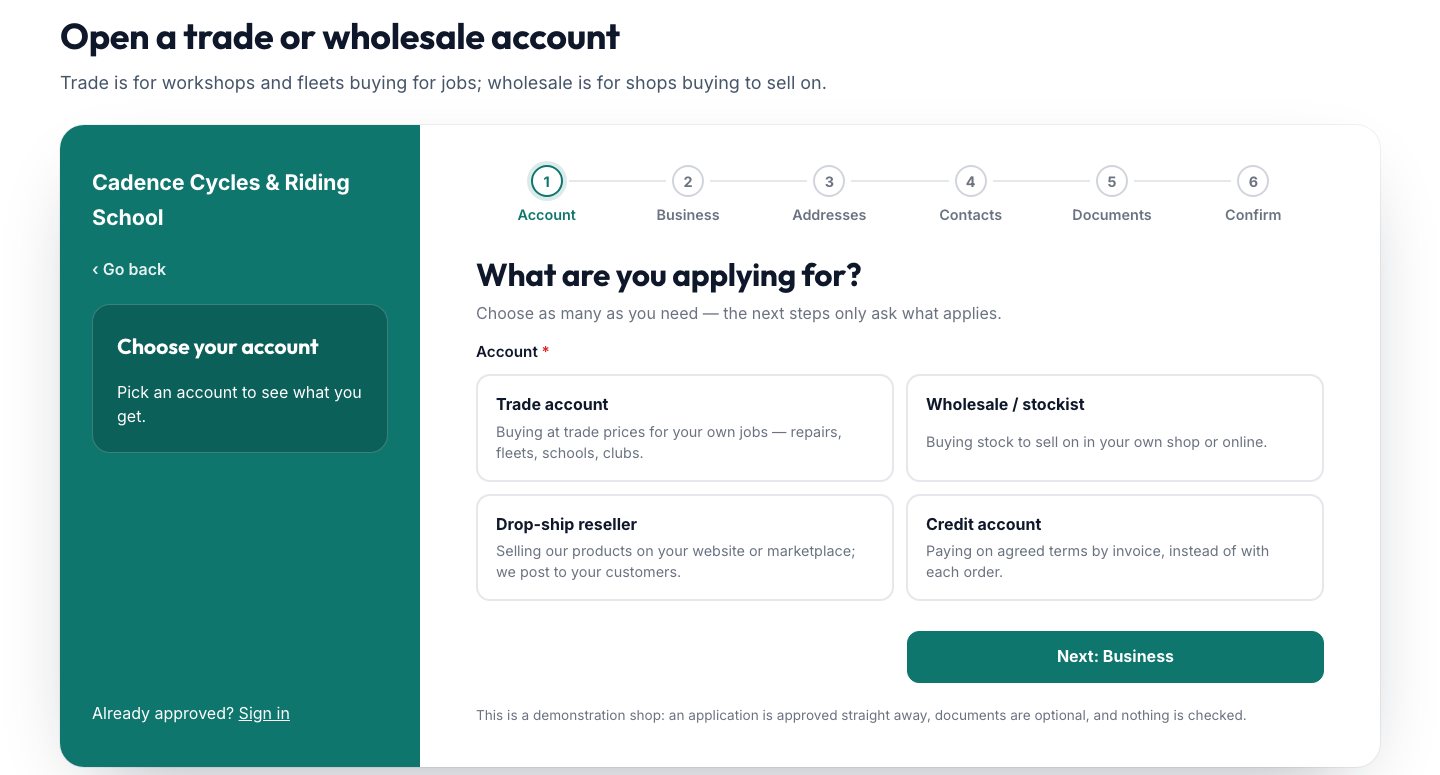
If you sell to other businesses, your trade customers apply on your website. Once you approve them, they sign in and see their own prices on every product, with quantity prices where you set them, and can pay on account by invoice. You can even hide your prices from everyone who isn’t signed in.
Selling without holding stock
Add products from AliExpress straight into your shop, priced by your own markup. When a customer pays, the order goes to the supplier to post straight to them, and the tracking number comes back to your customer. Your own products and dropshipped ones sit side by side in one shop.
Ecommerce products: everything a product can be
Most shops sell more than one kind of thing. A bike shop sells bikes, but also services, hire and care plans; a training company sells courses and downloads. In the Mediatopia CMS each of those is a product, in the same shop, through the same basket.
Goods
The products you post or have collected. Each has its photographs, a description, a price, stock that counts down as it sells, and a weight if you charge delivery by weight.
Downloads
Sell files: guides, plans, music, templates. Once the order is paid, the customer’s download is waiting for them on the thank-you page and in their account.
Services
Sell a service as a product and the customer chooses their day and time as they buy, from times that are genuinely free in your diary.
Hire
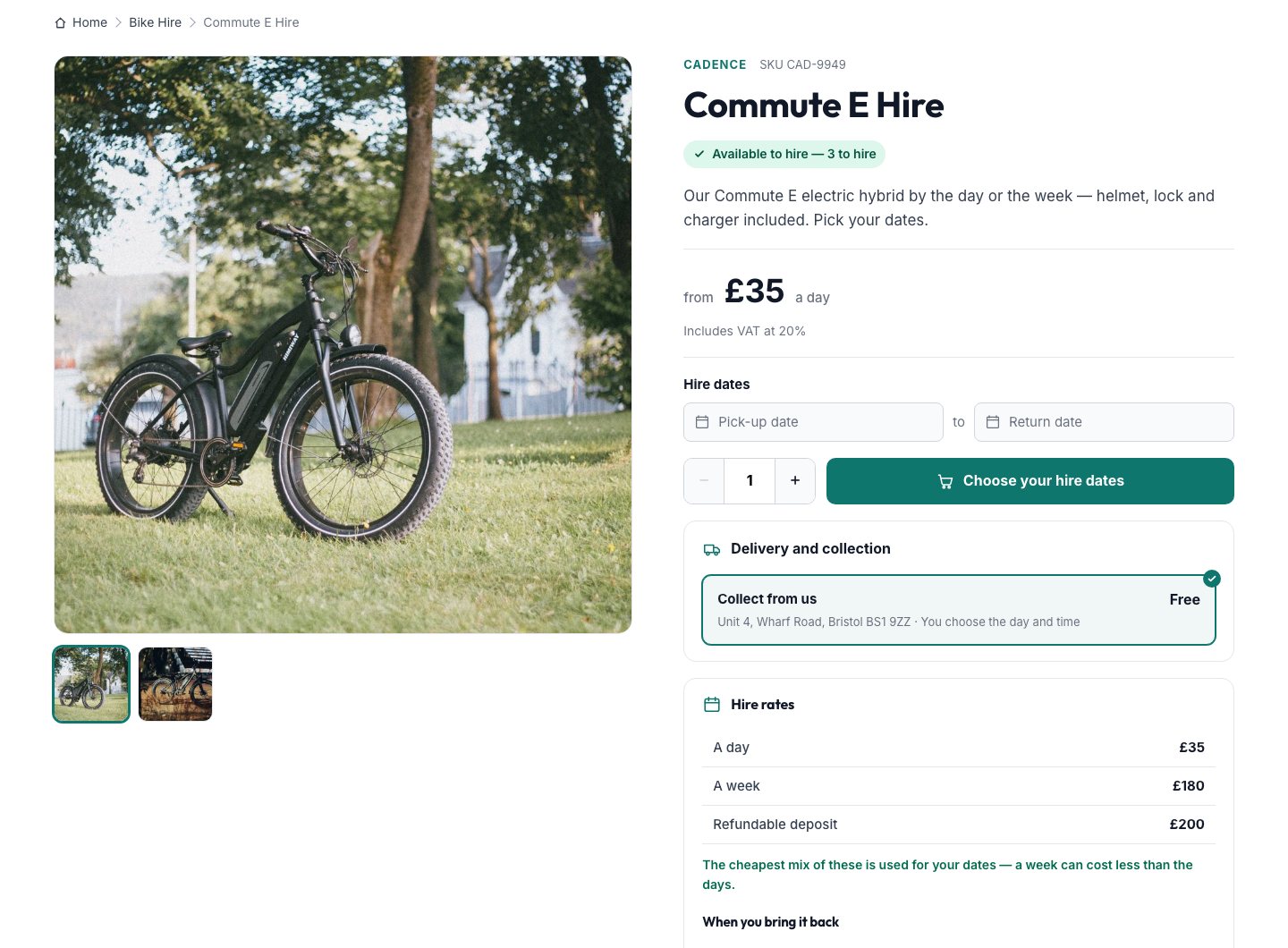
Hire things out by the day or the week. Customers pick their dates, see what’s free on those days, and pay the cheapest mix of your rates, with a refundable deposit if you take one.
Subscriptions
Sell something that renews: a care plan, a membership, a box every month. It’s billed by card each period, with a free trial if you want one.
And for every product
- Categories and sub-categories, each with its own page
- Bundles of products sold together
- A was-price to show the saving
- Featured products first, in the order you choose
- Hidden, search only, or catalogue only (shown but not sold)
- Out of season: shown, marked, not sold
- A note to the customer with their order
- Its own SEO title and description
An online shop basket and checkout
A checkout should get out of your customer’s way. Ours is short and works on any phone: the basket shows the savings and the delivery cost before they commit, the checkout asks only what it needs, and the payment page is Stripe’s own, which customers already trust.
- 01Add to basketThe basket slides out with what’s in it, so they can carry on shopping or check out.
- 02The basketOffers come off by themselves, a coupon code goes in, and delivery choices show with their prices.
- 03CheckoutTheir details, delivery or collection, and how they’d like to pay, on one page.
- 04PayA secure card page on your own Stripe account, or another way you offer.
- Guest checkout, or ask customers to sign in first
- A basket that empties itself after the time you set
- Your terms page ticked before they pay, if you want it
- A thank-you page that offers to save their details
Customer accounts, with no passwords to forget
Customers sign in with their email address and a six-digit code sent to it. There’s no password to remember, and a new email simply becomes a new account. Signed in, they see their orders and invoices, order again in a couple of clicks, keep their addresses, save a card for next time and save products they like for later.
In the CMS, every customer has a record with their orders, whether they have an account, when they last signed in and the addresses they’ve saved, so you know who you’re dealing with before you pick up the phone.
- Sign in with a code, not a password
- Order history and buy again
- Saved addresses and saved cards
- Saved products for later
- Their invoices in their account
- Trade prices when they sign in
Discounts, coupons and offers
Offers sell. Make a coupon code for a newsletter or a flyer, or an offer that applies by itself, like buy two and get one free, or free delivery over a set amount. Offers can be for everyone or for one group of customers, they come off in the basket and again at the checkout, and you can see how many times each code has been used. An offer can also show as a banner on your shop, so nobody misses it.
Delivery, collection and VAT
Delivery and tax are where shops get things wrong, and customers notice. The Mediatopia CMS works both out for you, the same way in the basket, at the checkout, on the order, in the emails and on the invoice.
Delivery charges
Charge one price for everything, charge by weight using the weight of what’s in the basket, or charge by area. Set free delivery over an amount, and the basket shows the customer how close they are.
Collection, with collection times
Let customers collect for free. Turn on collection times and they choose a day and a time from your own slots, a slot that’s full says so, and the time is on the order and in both emails.
VAT
Tell the CMS whether you’re VAT-registered and it does the rest: each product at its own rate (standard, reduced or zero), VAT included in your prices or added at the checkout, VAT on delivery if you choose, and the VAT shown on the order and the invoice. Not registered, and nothing on your website mentions VAT.
Charity purchases
Turn on charity exemption and the checkout asks charities for their charity number, which is kept on the order for you to check.
Taking payments: the money goes straight to you
Card payments go through your own Stripe account. Your customer pays on Stripe’s secure page, the order is marked paid the moment Stripe confirms, and the money is paid into your bank by Stripe. It never passes through ours, and signed-in customers can save their card for next time.
You can also offer bank transfer, cash on delivery, or, for approved trade customers, payment on account by invoice within their own terms and credit limit.
- Your own Stripe account, your own money
- Saved cards for signed-in customers
- Bank transfer and cash on delivery if you want them
- On account for approved trade customers
Orders, emails and tracking
Every order lands in the CMS with its customer, what they bought, how they’re getting it and how they paid. Your customer gets their confirmation and you get a new-order email straight away. Mark an order as shipped and your customer is emailed that it’s on its way, with the tracking number if you’ve added one.
Refund an order and the stock goes back on the shelf. Cancel one and its unpaid invoice is cancelled too. Notes you write on a product go to the customer with their order, and everything can be exported when your accountant asks.
- Confirmation and new-order emails
- Shipped emails with tracking
- Refunds that put the stock back
- Cancellations that cancel the invoice
- Product notes sent with the order
- Export for your accountant
Wholesale and trade ecommerce, built in
Selling to other businesses is usually a separate system, or a spreadsheet and a lot of phone calls. In the Mediatopia CMS it’s part of the same shop.
The application
A proper trade-counter application on your own website, in steps, asking only what applies to the account they want:
- Account: trade, wholesale, drop-ship reseller or credit
- Business: name, type, Companies House, VAT, years trading
- Addresses and contacts
- How they’ll buy, and the credit they’d like
- Documents you ask for
- Check and send
It lands in the CMS, where you read every answer, open their documents and approve them in one click.
Their prices
Approved customers go into a group with its own discount and minimum order. Signed in, they see their own price on every product, with your shop price shown as the RRP and their saving, plus quantity prices where a product has them. The basket and checkout charge those prices.
Prices for the trade only
If your prices are for the trade only, hide them from anyone who isn’t signed in, or hide the products themselves behind a sign-in. Wholesale accounts can be held to a minimum number of items per order.
Credit accounts
Customers approved for credit can pay on account: the checkout shows how much of their limit is left, refuses an order over it, and raises an invoice due on their terms. Every morning, unpaid invoices past their due date are marked overdue and the customer gets a reminder.
Dropshipping from AliExpress
Find products on AliExpress from inside the CMS, choose the photographs, the sizes and colours you want, and add them to your shop, priced by your own rules: one markup, or different ones by price band or category, rounded to 99p if you like. Prices and stock are checked with the supplier every six hours, so you never sell something you can’t supply or sell it at a loss.
When a customer pays, the order goes to the supplier with the address checked and the customer’s note passed on, or it can go automatically. The tracking number comes back onto the order, your customer is emailed, and they can follow it on your website’s own tracking page.
Invoices for your customers
Orders on account raise their own invoices, and you can make any other invoice you need from the same screen, with your customers looked up as you type. VAT shows on the invoice when you’re registered. Every morning, invoices past their due date are marked overdue, and the customer is reminded on the day you choose.
Who is our ecommerce CMS for?
Any business that sells, and especially businesses that sell in more than one way.
Shops and retailers
Products, offers, delivery and collection, and customers who come back.Trade counters and wholesalers
Trade applications, trade prices, minimum orders and credit accounts.Makers and small brands
Products with sizes and colours, bundles and a was-price.Garages, workshops and bike shops
Parts and products alongside services booked into the diary.Hire businesses
Hire by the day or week with deposits, and what’s free on every date.Clubs, gyms and subscriptions
Memberships and care plans that renew by card, with free trials.Course and content sellers
Downloads waiting on the thank-you page and in the customer’s account.New online businesses
Dropshipping from AliExpress, without buying stock first.
Questions about our ecommerce CMS
Do I need my own Stripe account?
Yes, for card payments. It’s free to open, your customers’ payments go straight into it, and Stripe pays them into your bank. We connect it to your shop for you.
Can I sell to the public and to the trade on the same website?
Yes. Everyone sees the same shop; approved trade customers see their own prices when they sign in.
Can I sell services, hire and subscriptions as well as products?
Yes. Each is a product in the same shop: a service books a time in your diary, hire takes dates and a deposit, and a subscription renews by card.
Does it work out VAT?
Yes, if you’re registered: each product at its own rate, included in your prices or added at the checkout, and shown on the order and the invoice.
Can customers track their orders?
Yes. They’re emailed when an order is shipped, with the tracking number, and dropshipped orders can be followed on your website’s own tracking page.
Can I try it before I buy?
Yes. Press Try it now and you’re in your own copy of our demo shop and its CMS for 10 minutes, with nothing to fill in.
How much does it cost?
See our pay monthly ecommerce websites for prices.
Book a guided demo of the Mediatopia CMS
Tell us a little about your business and what you would like to see, and we will be in touch to arrange a time to show you round the CMS.
Try it for yourself
Your own copy of a working website and its content management system, ready in seconds. No form, no sales call.