The Mediatopia CMS · Bookings and courses
An online booking system that only offers the times you’re free
Appointments, courses, classes and tables, booked on your own website, at times that are genuinely free. Services with staff and add-ons, timetables with places that count down, and every booking in the same system as the rest of your business.
What is an online booking system?
An online booking system lets your customers book you on your website, at any hour, without ringing. They choose what they want, pick a day and a time that’s free, leave their details, and the booking lands in your diary. For a business that lives by appointments, classes or courses, it’s the difference between answering the phone all day and finding the diary full in the morning.
Most small businesses get one by signing up to a separate booking service and putting its widget on their website. It works, but it’s another login, another monthly fee, another brand in the middle of your website, and your customers end up in a list you can’t see beside your orders, enquiries and invoices.
Why take bookings through the Mediatopia CMS?
Because the booking system is part of your website, not a box on it. Your services are drawn in your website’s own design, the booking form is your own, and every booking lands in the same CMS as your pages, enquiries, customers and invoices. A customer who books a service is the same customer who bought from your shop last month.
And it only ever offers times that are genuinely free. Your working hours, how long each service takes, the gap you need between jobs and the days you’re away all decide what your website offers, and every booking already in the diary is taken off. Nobody books a time you can’t do.
- Bookings on your own website, in your own design
- Only the times that are really free
- In the same CMS as your customers and invoices
- No separate booking service or fee
The online booking system is part of the Mediatopia CMS behind our pay monthly websites. For bookings that still come in by phone, see the AI receptionist; for restaurants, cafés and venues, see hospitality web design.
Appointments, courses and tables, in one system
Businesses book in different ways. A garage books one car at a time; a riding school fills eight places on a Saturday morning; a restaurant books tables. The Mediatopia CMS does all three, so a business that does more than one, like a bike shop with a workshop and a riding school, runs them from one place.
Appointments and services
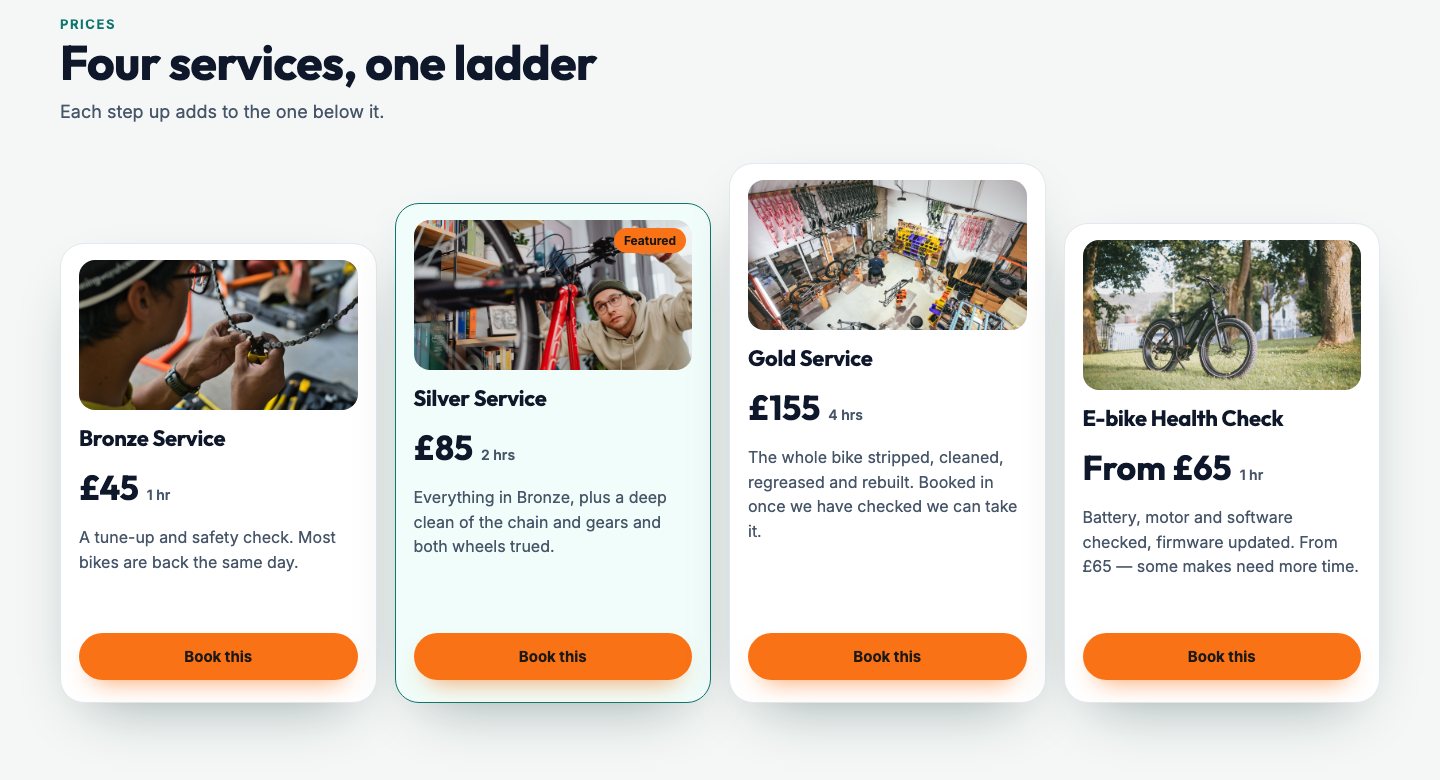
One customer, one time: a service, a fitting, a consultation, a repair, a treatment. Each service has its price, how long it takes and who can do it, and your customer picks a time that’s free.
Courses and classes
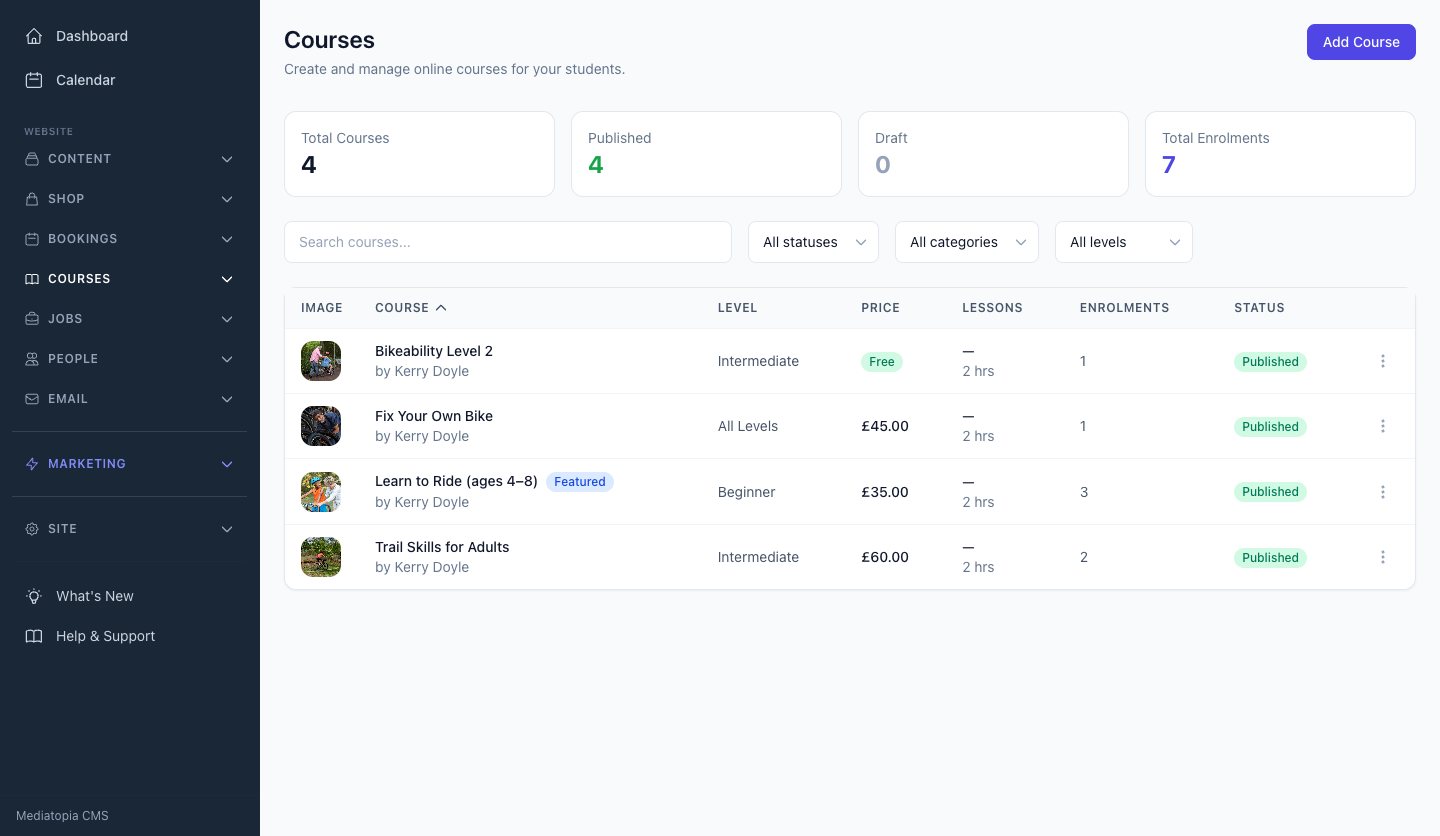
Many people, one date: lessons, classes, workshops, training days. Each course has its dates, and each date has a number of places that count down as they’re booked.
Tables and events
A table booking takes the party size, the seating area and the occasion, and lands in the same bookings list as everything else. Events, from open days to club rides, take sign-ups with an attendees list; they’re on our website page.
Your services, set up once
Everything about a service lives on the service: what it is, what it costs, how long it takes, who does it and what extras go with it. Change it in the CMS and your website changes with it.
On your website
Each service shows its short description, its price (a set price, “From £65”, free, or price on application) and how long it takes. Mark one Featured and it carries a Featured label, so the one you want to sell most stands out. Book this takes your customer straight to the form with that service already chosen.
On the booking form
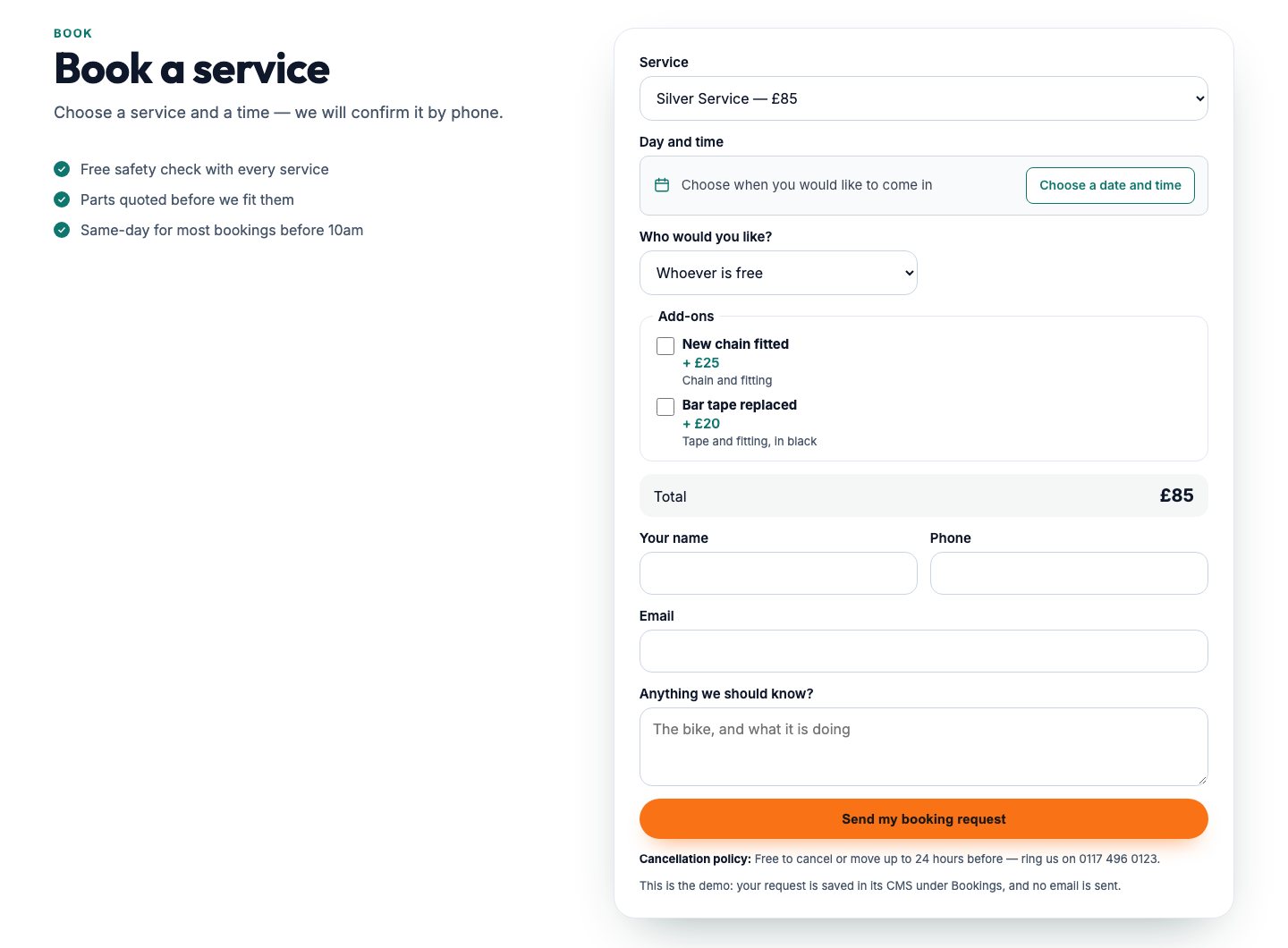
The form adapts to the service chosen. Add-ons appear as tick boxes with their prices; “Who would you like?” lists the staff who do that service, or whoever is free; “Number of people” appears when a service takes more than one; a running total adds it all up; and the deposit and your cancellation policy are shown before they book.
Your rules
Decide whether a service can be booked online at all, whether each booking waits for your approval, how many people it can take at once, what deposit it needs, and what your cancellation policy says. Each service keeps its own search engine title and description, too.
- Price, “From” price, free or price on application
- How long it takes, and the gap after it
- Add-ons with their own prices
- The staff who do it, chosen by the customer
- More than one person at a time
- Deposit and cancellation policy shown before booking
Only the times you’re really free
The worst thing a booking system can do is let someone book a time you can’t do. Every service in the Mediatopia CMS has its own availability, and the date-and-time window on your website offers only what’s left once the diary has been taken off: no clashes, no double bookings, and no calls to rearrange.
When a booking is sent, the time is checked again against that service before it’s saved, so two people can’t take the same slot in the same minute. A service that takes more than one person keeps a time open until it’s full.
- 01Your days and hoursTick the days you work and set the time you open and close.
- 02Length and gapSet how long the service takes and the buffer you need after it.
- 03Notice and how far aheadSet the minimum notice you need, and how far ahead people can book.
- 04Days awayBlock out holidays and closures, with a reason if you like.
- Availability set per service
- Bookings already in the diary taken off
- Checked again the moment it’s booked
- Saved as you change it, with nothing to publish
A booking form that does the adding up
Your customer chooses a service, then a day and a time from the times that are free. If you’ve given the service add-ons, they tick the ones they want and see the price of each; if more than one person can do it, they choose who they’d like or leave it to whoever is free. The total adds itself up as they go, so nobody is surprised at the till.
Their name, phone and email, a box for anything you should know, and the booking is sent. Your cancellation policy is printed right under the button, so it’s agreed before they book, not argued about after.
Confirmed straight away, or when you say so
Some businesses want bookings confirmed the moment they’re made; others want to look at each one first. You choose per service. With approval off, a booking is saved as Confirmed and your customer is told so on the spot. With approval on, it waits as Pending until you confirm it, and your customer is told that you’ll be in touch.
Either way, every booking gets its own reference, you get an email the moment it’s made, and your customer gets a confirmation in your business’s name.
- Confirmed, or Pending until you approve
- A reference on every booking
- An email to you for each new booking
- A confirmation to your customer in your name
Every booking in one list
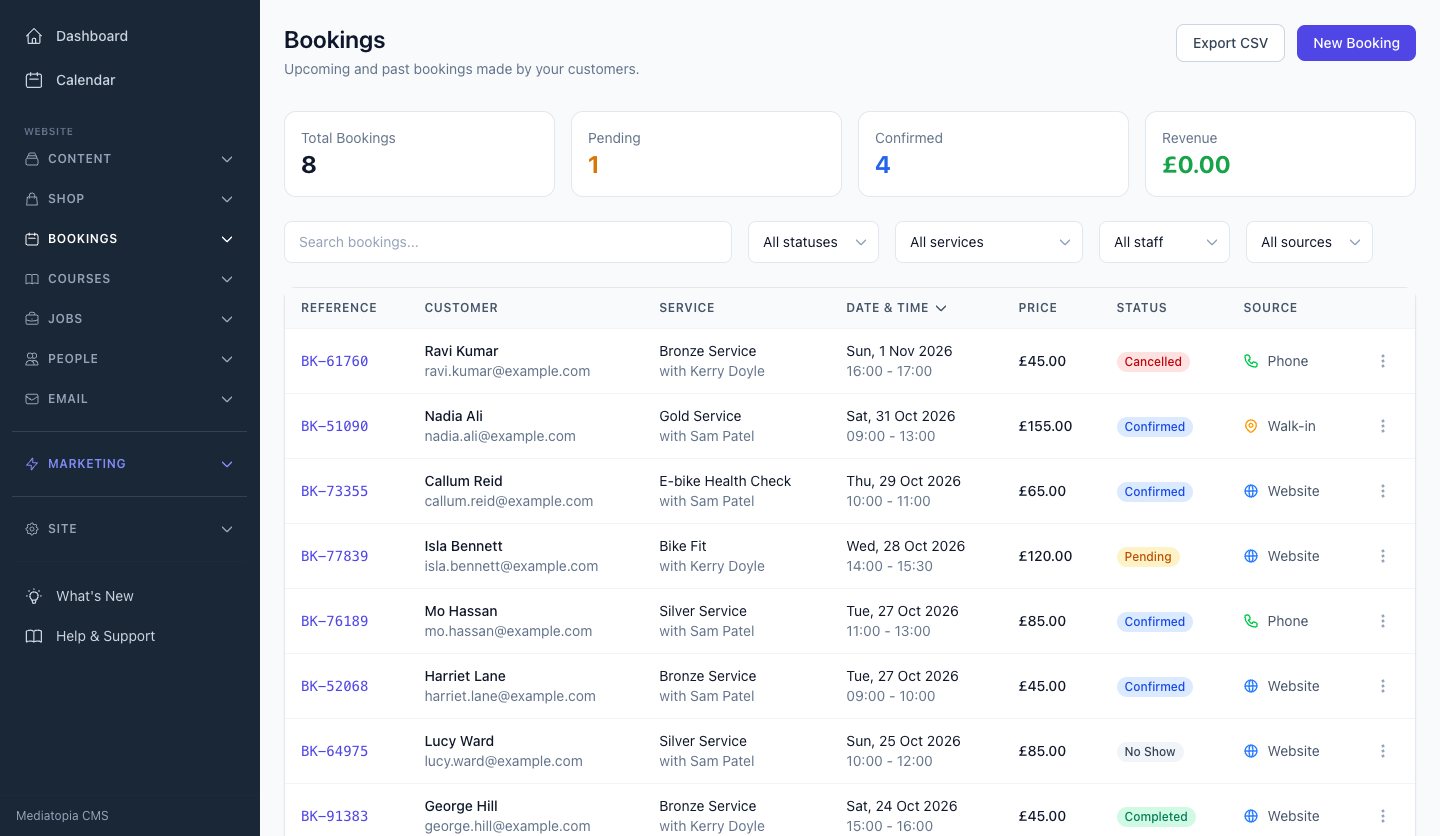
All Bookings is your diary as a list: every booking with its date, time, customer, service and who’s doing it, from your website and from anywhere else you take them. Open one and you see what they booked, the add-ons they chose, the total, and the deposit to take. Your Dashboard shows today’s bookings the moment you sign in.
Courses, classes and timetables
If you teach, train or coach, you sell dates and places, not appointments. Courses in the Mediatopia CMS are set up for exactly that: the course, the dates it runs, and the places on each date, all drawn on your website and all counting themselves.
The course
Each course has its name, who teaches it, what it covers, what to bring, its price and a sale price if you’re running one. Mark your best seller Featured and it goes first, labelled Popular.
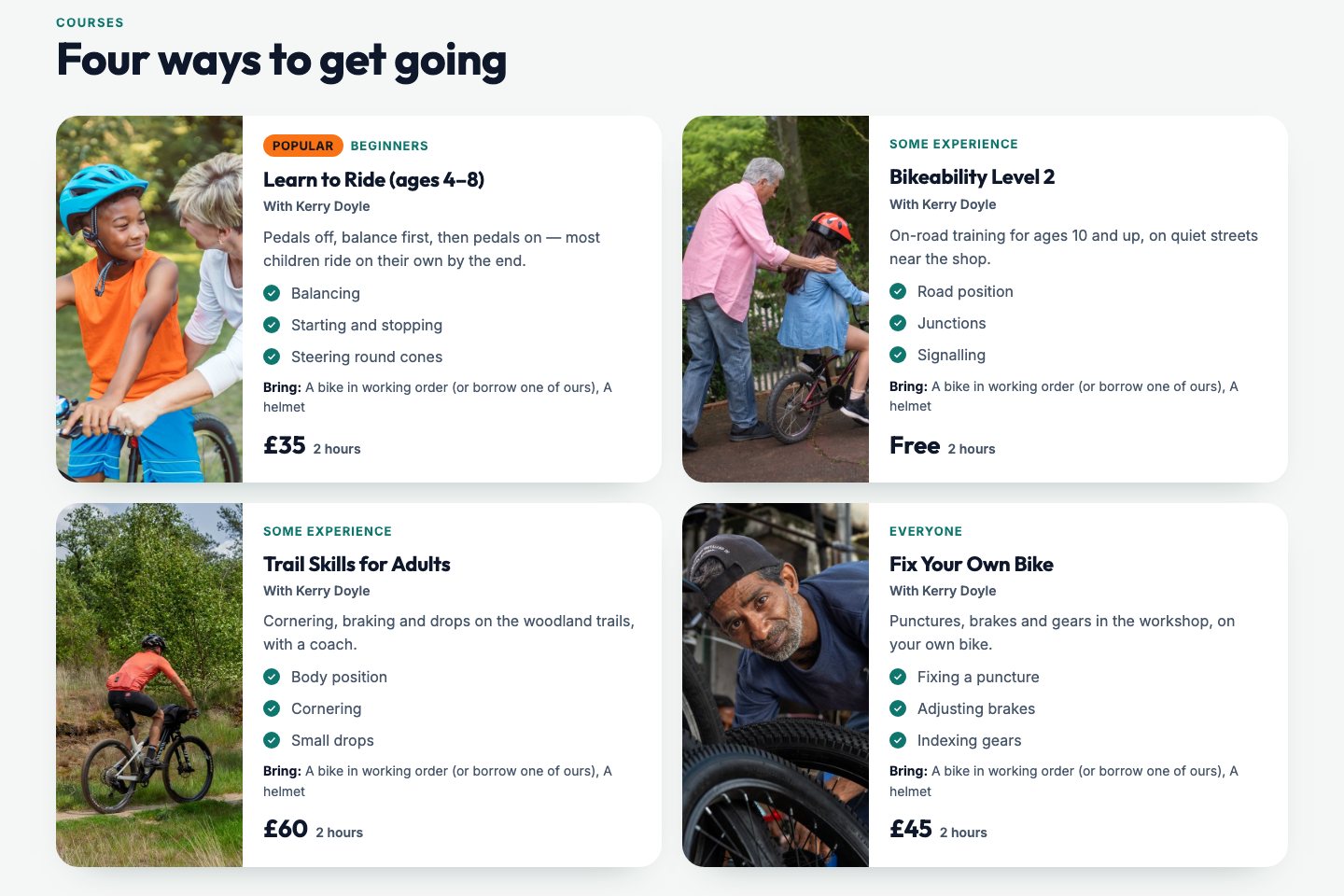
The dates
Each course has its sessions: the date and time, the venue, who’s teaching, a note for the public, and its own price if it differs. Give a date an early-bird price and a deadline, and the website shows the early price with the full price crossed out until the end of that day. A session can be in person, online or both, and the online link is only ever given to the people who’ve booked, in their account.
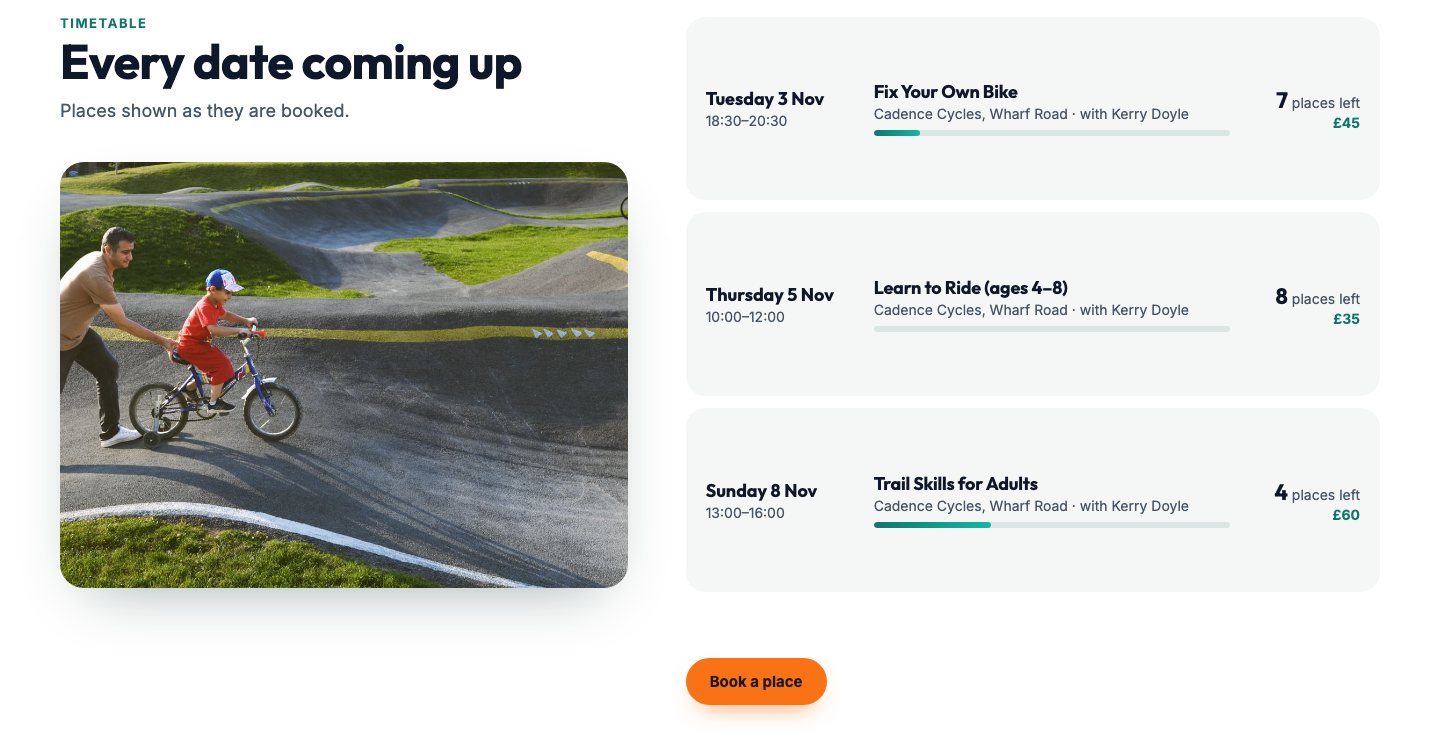
The places
Each date shows how many places are left, and a bar fills as they’re taken. A place booked on your website lands in Enrolments and is counted on its date straight away; cancel or delete an enrolment and the place goes back.
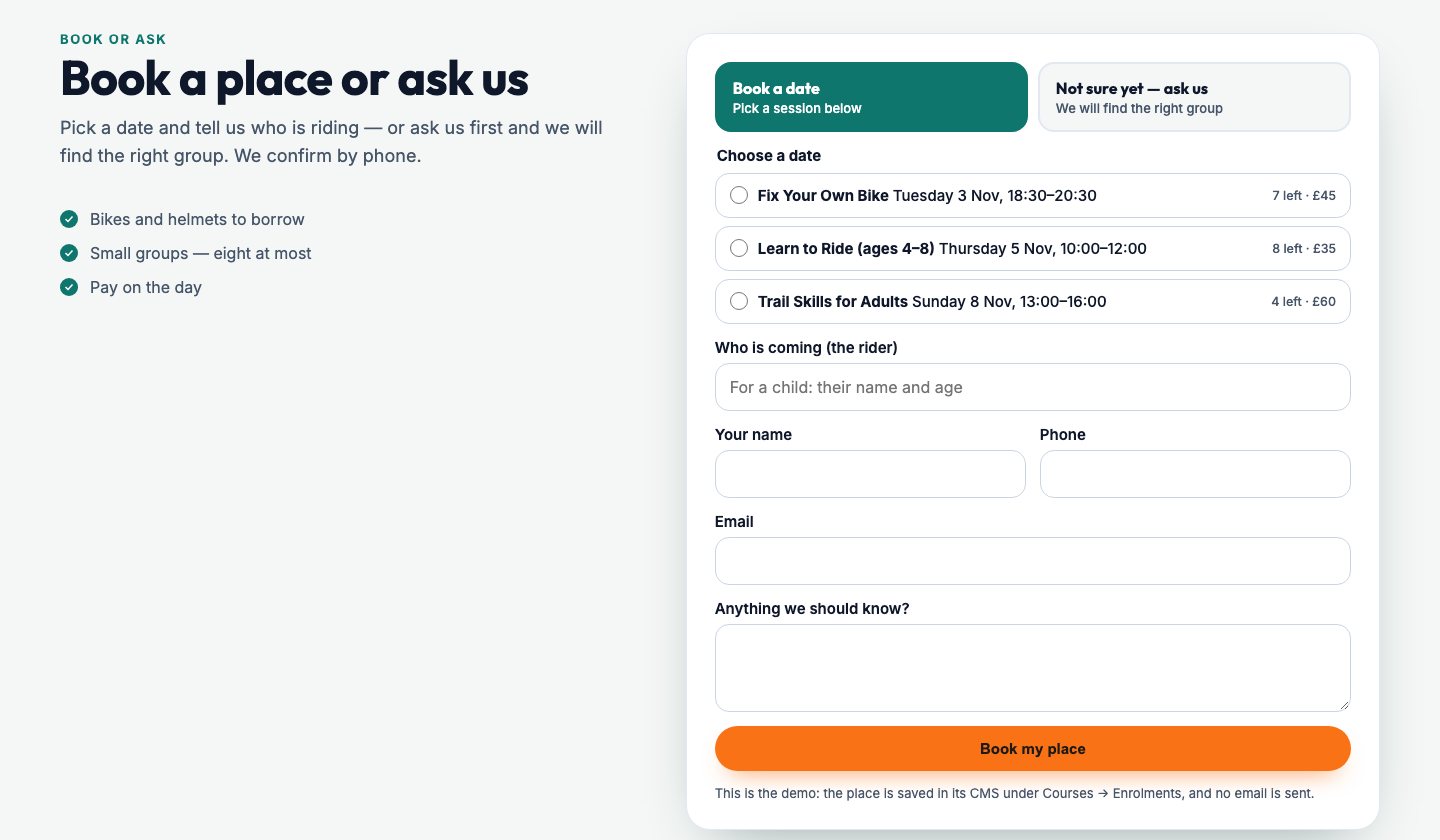
Book a place, or ask first
Not everyone is ready to book. Parents want to ask about ages, adults want to know if they’re fit enough. So the form on your website does both: “Book a date” lists the dates with their places and prices; “Not sure yet — ask us” turns the same form into a question that lands in your enquiries. One form, nobody turned away.
One calendar, on your phone too
Bookings, events and the posts you’ve scheduled all sit in one Calendar in the CMS, so you can see your week at a glance. Turn on your calendar address and it feeds straight into the calendar on your phone, whether that’s an iPhone, Android, Outlook or Google, so a booking made on your website at midnight is in your phone’s diary in the morning. The feed only shows; you change things in one place, the CMS.
Services in the shop, too
If you also sell online, a service can be a product in your shop: your customer chooses their day and time from the same free times as they buy, and pays for it with everything else in their basket. Hire works the same way, by the day or the week, with a deposit.
Who is our booking system for?
Any business that sells its time, its places or its tables.
Garages and workshops
Services with add-ons, the mechanic chosen, and the diary kept clear.Salons, clinics and therapists
Treatments with lengths and gaps, staff to choose and approval if you want it.Riding, driving and sports schools
Courses with dates, instructors and places that count down.Trainers and tutors
Classes in person or online, with the link only for those booked.Restaurants and cafés
Table bookings with party size, seating area and occasion.Consultants and advisers
Consultations confirmed by you before they’re fixed.Gyms and studios
A timetable of classes, early-bird prices and places left.Hire and activity businesses
Dates, deposits and how many people at a time.
Questions about our booking system
Can customers book a time I can’t do?
No. Your website only offers the times left once your hours, the service’s length, its gap and the bookings already in the diary are taken into account, and it checks again the moment they book.
Can I approve bookings before they’re confirmed?
Yes, service by service. With approval on, a booking waits as Pending until you confirm it.
Can customers choose who they see?
Yes. List the staff who do each service and your customer can choose one, or whoever is free.
Can I run courses and classes as well as appointments?
Yes. Courses have dates, each date has places, and places booked on your website are counted straight away.
Will bookings show in my phone’s calendar?
Yes. Your CMS calendar can feed the calendar on your phone, whether it’s iPhone, Android, Outlook or Google.
Can I try it before I buy?
Yes. Press Try it now and you’re in your own copy of our demo website and its CMS for 10 minutes, with nothing to fill in.
How much does it cost?
See our pay monthly websites for prices.
Book a guided demo of the Mediatopia CMS
Tell us a little about your business and what you would like to see, and we will be in touch to arrange a time to show you round the CMS.
Try it for yourself
Your own copy of a working website and its content management system, ready in seconds. No form, no sales call.